High-Volume Photography Workflow Automation Without Switching Gallery Platforms
High-Volume Photography Workflow Automation Without Switching Gallery Platforms
Keep your platform. Upgrade the workflow.
Keep your platform. Upgrade the workflow.
No credit card required
No credit card required
Works with ShootProof, Zenfolio, PhotoShelter, Pixieset, CloudSpot, PhotoDeck, Picflow, jAlbum, and virtually any high-volume photography workflow →









Stop sorting.
Start delivering.
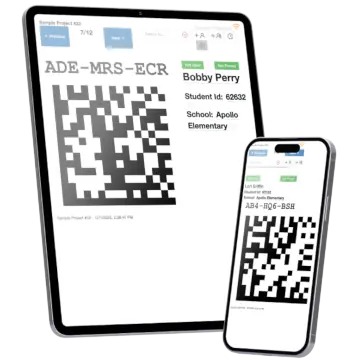
Snapizzi works with your current gallery platform and automates the busywork around volume delivery. Use Event Projects when you don’t have a roster, or Data Projects when you do—either way, customers find photos fast via your Studio Search Page or direct links.
Stop sorting.
Start delivering.
Snapizzi works with your current gallery platform and automates the busywork around volume delivery. Use Event Projects when you don’t have a roster, or Data Projects when you do—either way, customers find photos fast via your Studio Search Page or direct links.

Event Project Cards
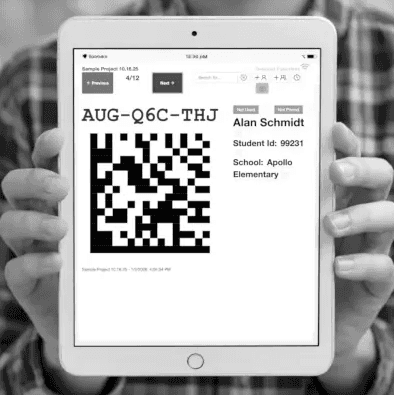
No roster required. Photograph the card and hand it out—the photo automatically links the customer to their images.


Data Project Cards
Roster-based. Import your list and Snapizzi does the matching automatically, so each customer lands in the right gallery fast.
Automatic Matching
Snapizzi reads your codes and automatically matches photos to the right person—no manual naming, renaming, or spreadsheet hunting.
Automatic Matching
Snapizzi reads your codes and automatically matches photos to the right person—no manual naming, renaming, or spreadsheet hunting.
Automatic Matching
Snapizzi reads your codes and automatically matches photos to the right person—no manual naming, renaming, or spreadsheet hunting.
Project Dashboard
Track progress in real time. See what’s scanned, what’s matched, and what still needs attention—so nothing slips through the cracks on a big job.
Project Dashboard
Track progress in real time. See what’s scanned, what’s matched, and what still needs attention—so nothing slips through the cracks on a big job.
Project Dashboard
Track progress in real time. See what’s scanned, what’s matched, and what still needs attention—so nothing slips through the cracks on a big job.
Studio Search Page
Give customers a white-labeled Search Page that lets them find their photos fast—by code, email, or whatever identifier you support for that project.
Studio Search Page
Give customers a white-labeled Search Page that lets them find their photos fast—by code, email, or whatever identifier you support for that project.
Studio Search Page
Give customers a white-labeled Search Page that lets them find their photos fast—by code, email, or whatever identifier you support for that project.
Instant Photo Access
Customers find their images fast using your white-labeled Studio Search Page—or your platform’s native search when available.
Instant Photo Access
Customers find their images fast using your white-labeled Studio Search Page—or your platform’s native search when available.
Instant Photo Access
Customers find their images fast using your white-labeled Studio Search Page—or your platform’s native search when available.
Smart Repair Tools
Fix issues fast. Catch the common time-killers—mis-scans, duplicates, orphan photos, and sync issues—with our built-in Smart Repair Tools.
Smart Repair Tools
Fix issues fast. Catch the common time-killers—mis-scans, duplicates, orphan photos, and sync issues—with our built-in Smart Repair Tools.
Smart Repair Tools
Fix issues fast. Catch the common time-killers—mis-scans, duplicates, orphan photos, and sync issues—with our built-in Smart Repair Tools.
One-click Exports
Generate Bundles that rename, resize, and organize files into folders—plus create proof sheets and export project data.
One-click Exports
Generate Bundles that rename, resize, and organize files into folders—plus create proof sheets and export project data.
One-click Exports
Generate Bundles that rename, resize, and organize files into folders—plus create proof sheets and export project data.
Four steps to painless volume delivery
A simple QR code workflow that eliminates manual matching and gets galleries ready to sell.
Shoot
Shoot as usual—just photograph a Snapizzi QR code before each subject or group to lock in organization from the start.
Shoot
Shoot as usual—just photograph a Snapizzi QR code before each subject or group to lock in organization from the start.
Send
Upload to Snapizzi. Snapizzi automatically matches photos to the right person—no manual naming or spreadsheet hunting.
Send
Upload to Snapizzi. Snapizzi automatically matches photos to the right person—no manual naming or spreadsheet hunting.
Port
Port matched photos to your sales platform, or generate Export Bundles (folders, renames, resizing) for delivery anywhere.
Port
Port matched photos to your sales platform, or generate Export Bundles (folders, renames, resizing) for delivery anywhere.
Sell
Once photos are ported—or your Bundle is ready—your galleries are organized, searchable, and ready for customers to order.
Sell
Once photos are ported—or your Bundle is ready—your galleries are organized, searchable, and ready for customers to order.
What our customers are saying
What our customers are saying
Trusted by high-volume photographers since 2015
Trusted by high-volume photographers since 2015
Trusted by high-volume photographers since 2015
































"Snapizzi has become an essential part of how we operate. It’s intuitive, efficient, and backed by support that truly cares."

Michael Moenning
Northlight Studio, Inc.
Wauconda, Illinois, USA
Read full testimonial →
"I’ve been using Snapizzi for almost a decade now, and the updated version is truly the backbone of my workflow."

Bree Royer
512 Portrait Company
Austin, Texas, USA
Read full testimonial →
"Snapizzi completely changed how we handle volume jobs. It saves hours and our customers love how easy it is to find their photos."

Meggan Whitsitt
Truly You Photography
Enid, Oklahoma, USA
Read full testimonial →
"Snapizzi has become a major part of my business, saving me more than 80 hours in a typical active month."

Susan Michal
Susan Michal Portrait Studio
Jacksonville, Florida, USA
Read full testimonial →
"We’re now handling jobs with 5,000+ images that require virtually no manual fixes — which still blows my mind."

Brandon Potter
Brandon Potter Photo & Design
Kinston, North Carolina, USA
Read full testimonial →
"The best customer service I’ve had from any company… Ever! Randy and his team are top-notch!"

Craig Lanning
Lankuf Promotions
Waterloo, Ontario, CAN
Read full testimonial →
"Snapizzi has become an essential part of how we operate. It’s intuitive, efficient, and backed by support that truly cares."
Michael Moenning
Northlight Studio, Inc.
Wauconda, Illinois, USA
Read full testimonial →
"Snapizzi completely changed how we handle volume jobs. It saves hours and our customers love how easy it is to find their photos."
Meggan Whitsitt
Truly You Photography
Enid, Oklahoma, USA
Read full testimonial →
"We’re now handling jobs with 5,000+ images that require virtually no manual fixes — which still blows my mind."
Brandon Potter
Brandon Potter Photo & Design
Kinston, North Carolina, USA
Read full testimonial →
"Snapizzi has become an essential part of how we operate. It’s intuitive, efficient, and backed by support that truly cares."
Michael Moenning
Northlight Studio, Inc.
Wauconda, Illinois, USA
Read full testimonial →
"We’re now handling jobs with 5,000+ images that require virtually no manual fixes — which still blows my mind."
Brandon Potter
Brandon Potter Photo & Design
Kinston, North Carolina, USA
Read full testimonial →
"Snapizzi completely changed how we handle volume jobs. It saves hours and our customers love how easy it is to find their photos."
Meggan Whitsitt
Truly You Photography
Enid, Oklahoma, USA
Read full testimonial →
"I’ve been using Snapizzi for almost a decade now, and the updated version is truly the backbone of my workflow."
Bree Royer
512 Portrait Company
Austin, Texas, USA
Read full testimonial →
More love →
No credit card required
Transparent pricing.
Built for volume.
Snapizzi automates your high-volume workflow with a flat monthly price—no percentages, no surprises. Works with your current gallery platform.
AI-free by design — no facial recognition, no biometric profiling, no image training models. Your subject photos stay private.
Snapizzi Pro
Snapizzi Pro
$99
/month
No commissions on sales
Automatic matching for faster delivery
Direct gallery links for customers
Bundles + exports for any workflow
Groups + individuals supported
Up to 25,000 images included
Works with your current gallery platform
Multi-camera/multi-photographer ready
Smart Repair tools for common issues
White-labeled Studio Search Page
Support that is here when you need us
Automatic matching for faster delivery
Direct gallery links for customers
Bundles + exports for any workflow
Groups + individuals supported
Up to 25,000 images included
Works with your current gallery platform
Multi-camera/multi-photographer ready
Smart Repair tools for common issues
White-labeled Studio Search Page
Support that is here when you need us
Questions? Answers.
Questions? Answers.
No credit card required