Miller’s Lab Export and New Workflow Tools

Snapizzi workflow preparing organized student portraits and subject data for Miller's Lab school photography products.

Millers Lab Export and New Workflow Tools

pull-quote-left

An early Snapizzi update made it easier to move organized school photography projects from Picture Day into lab production—and introduced workflow tools that are still part of Snapizzi today.

snapizzi-favicon

The Snapizzi Team

Originally published

9 years ago

Updated

1 week ago
4 min read 633 words

Miller’s Lab Export and New Workflow Tools

Snapizzi workflow preparing organized student portraits and subject data for Miller's Lab school photography products.

Millers Lab Export and New Workflow Tools

pull-quote-left

An early Snapizzi update made it easier to move organized school photography projects from Picture Day into lab production—and introduced workflow tools that are still part of Snapizzi today.

An early Snapizzi update made it easier to move organized school photography projects from Picture Day into lab production—and introduced workflow tools that are still part of Snapizzi today.

snapizzi-favicon

The Snapizzi Team

Originally published

9 years ago
9 years ago

Updated

1 week ago
1 week ago
4 min read 633 words
snapizzi-favicon

The Snapizzi Team

Originally published

9 years ago

Updated

1 week ago
4 min read 633 words

High-volume photography doesn't end when the images are matched to the right subjects.

For many school photographers, the next step is getting those images—and the data connected to them—into the systems used to produce ID cards, composites, mug books, and other school service items.

An early Snapizzi update made that process significantly easier.

We introduced a Miller's Lab export workflow that could assemble the images and associated project data photographers needed for school service items. At the same time, we added new tools for adding group photos to existing projects and sharing a photo series between multiple subject galleries.

Those features solved different problems, but they shared the same idea:

Once Snapizzi knows which images belong to which subjects, that organization should be useful throughout the rest of the workflow.

pull-quote-left
pull-quote-left

The destination can change. The underlying automation stays the same.

Preparing School Photography Projects for Miller's Lab

Preparing School Photography Projects for Miller's Lab

School service items often require more than a folder full of photographs.

The lab needs the right images connected to the right student information and organized in a predictable format.

Snapizzi already had that relationship.

Because a Data Project connects each subject's information with the photographs captured for that subject, Snapizzi could use those relationships to prepare an organized export rather than forcing the photographer to rebuild everything manually after Picture Day.

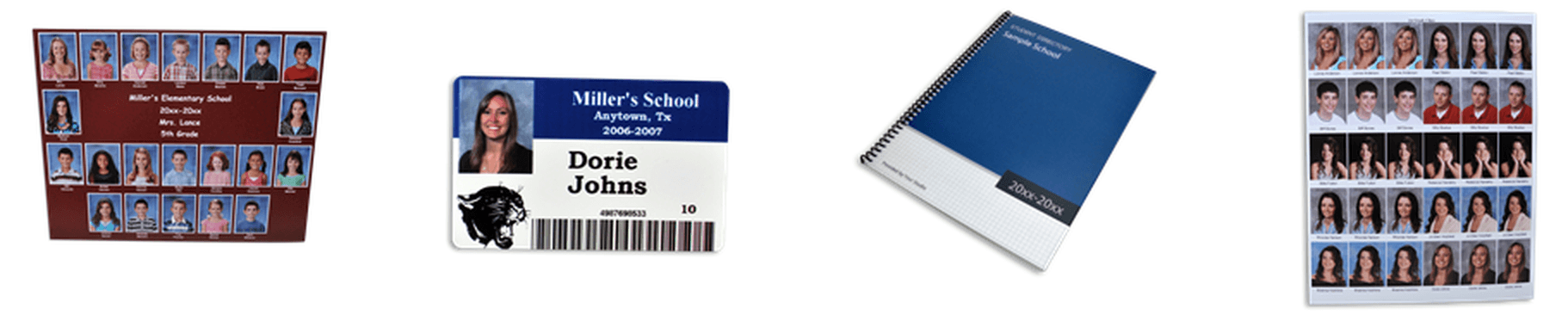
The Miller's Lab export made it possible to assemble the files and data needed for products such as:

  • ID cards

  • composites

  • mug books

  • other school service items

That reduced another layer of repetitive sorting and data handling between photography and production.

millers-school-service-items

The Foundation Became Snapizzi Bundles

The Foundation Became Snapizzi Bundles

The Miller's workflow also demonstrated something much broader.

The same system used to prepare files for a specific lab could be used anywhere photographers needed organized images and their associated subject data outside of Snapizzi.

That capability became part of the larger Snapizzi Bundle workflow.

Today, Bundles can package project images together with a manifest containing the associated project data. Photographers can control how images are organized, rename files, resize images, select which images are included, and create folder structures based on project data.

That makes Bundles useful well beyond lab submission.

They can be used for school deliverables, external processing, archive workflows, and even gallery platforms that aren't directly integrated with Snapizzi.

The destination can change.

The underlying automation stays the same.

pull-quote-left
pull-quote-left

Do the organizational work once, then let that structure keep working throughout the rest of the high-volume photography workflow.

Adding Group Photos After Picture Day

Adding Group Photos After Picture Day

This update also made it easier to add a group photo to an existing project.

Group photographs don't always follow the original plan. A group may need to be added after the project has already been created, or a photographer may discover that a group wasn't included in the original project data.

Rather than forcing photographers to rebuild the project, Snapizzi provided a way to add the missing group and connect its photographs to the appropriate workflow.

That capability has continued to evolve with Snapizzi's Repair tools.

Sharing a Photo Series Between Galleries

Sharing a Photo Series Between Galleries

We also introduced the ability to share a photo series with another subject's gallery.

One obvious use is sibling or buddy photography.

If two students are photographed together, both families may need access to those photographs. Instead of duplicating files or manually managing the images in multiple galleries, Snapizzi can associate the shared series with the appropriate subjects.

Today, Photo Series Sharing continues that concept, while Paperless workflows can use Pinning to establish those relationships directly on Picture Day.

One Project, More Ways to Use the Data

One Project, More Ways to Use the Data

Looking back, these additions were part of Snapizzi's evolution from simply matching photographs to subjects into managing more of what happens after those matches are made.

The subject data and image relationships established during Picture Day can continue working downstream.

They can help create galleries.

They can organize group photographs.

They can connect shared photo series.

And through Bundles, they can prepare organized images and data for labs and other destinations.

That's the larger goal behind Snapizzi: do the organizational work once, then let that structure keep working throughout the rest of the high-volume photography workflow.

Editor's Note: This article was originally published when Snapizzi introduced its Miller's Lab export along with new group-photo and photo-series sharing tools. The Miller's export helped establish the workflow that is now handled through Snapizzi Bundles. This article has been updated to explain how those original features fit into the current Snapizzi platform.

Related Help Articles

Step-by-step guides and documentation from the Snapizzi Knowledge Base.

Continue Exploring Snapizzi

Content Directory — Browse all articles and workflow resources

Release History — Explore new features and product updates

Knowledge Base — Find tutorials and documentation

User Love — See how photographers use Snapizzi