

High-volume photography creates organization challenges that most traditional portrait workflows never encounter.
When you are photographing schools, sports leagues, dance studios, graduations, camps, or large events, you may be working with hundreds or thousands of images from a single job.
Those images often need to be organized by:
• Student
• Team
• Grade
• Teacher
• Class
• Athlete
• Group
• Event
• Gallery structure
ShootProof is a strong platform for gallery delivery, ordering, downloads, and customer experience.
Many photographers also use ShootProof for high-volume school, sports, and dance photography.
But before galleries are published, photographers still need a reliable way to organize images correctly.
That is where workflow matters.
The better your galleries are organized before galleries are published, the easier it is for customers to find and order photos.
Snapizzi integrates directly with ShootProof to help photographers automate organization, streamline gallery preparation, reduce repetitive work, and speed up high-volume workflows without replacing the platform they already trust.
ShootProof categories give photographers a way to keep galleries organized inside their ShootProof account.
For high-volume photographers, this can be especially useful when managing multiple jobs, schools, teams, or events.
For example, categories can help separate:
• Schools
• Sports leagues
• Dance studios
• Graduation events
• Seasonal jobs
• Client organizations
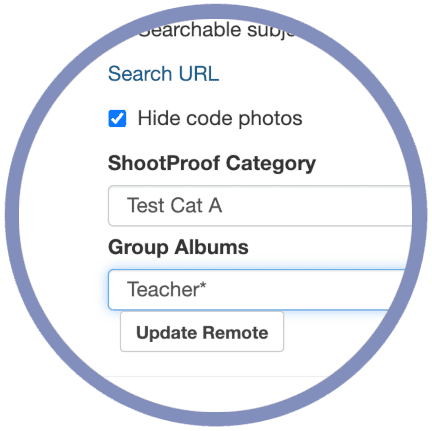
Snapizzi supports ShootProof categories when porting projects, allowing photographers to choose the ShootProof category where a project should be placed.
Instead of manually organizing everything after upload, photographers can prepare the project in Snapizzi and send it into the correct ShootProof structure.
This helps keep large ShootProof accounts cleaner and easier to manage.
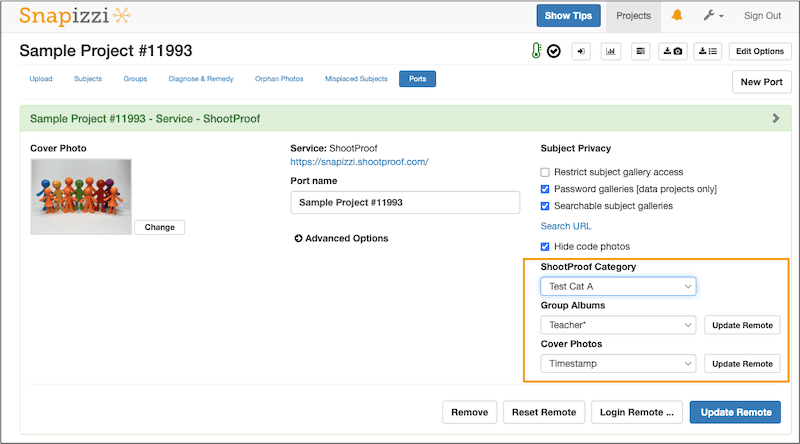
When porting a project from Snapizzi to ShootProof, photographers can choose from the categories already set up inside their ShootProof account.
That means a school, league, dance studio, or event can be sent into the correct category during the porting process.
This is especially helpful for photographers managing multiple active jobs at the same time.
Instead of uploading everything into one general area and sorting later, Snapizzi helps place projects into the right ShootProof category from the start.
This reduces manual cleanup and helps keep your ShootProof workspace organized.

For high-volume photographers, subject albums often need to be organized into logical groups before they are sent to ShootProof.
In Snapizzi, the Group Albums option determines how subject albums should be grouped during the porting process.
For school photography, subject albums may be grouped by:
• Teacher
• Grade
• Classroom
• Homeroom
• Program
For sports photography, subject albums may be grouped by:
• Team
• Division
• Age group
• Coach
• League
For dance photography, subject albums may be grouped by:
• Class
• Routine
• Costume
• Age group
• Performance group
Snapizzi uses the selected grouping field to organize subject albums when they are exported or ported to ShootProof.
This helps photographers avoid manually reorganizing albums after upload and keeps the final gallery structure easier for customers to navigate.
Cover photos can make galleries easier to browse and more polished for customers.
Snapizzi gives photographers multiple options for automatically assigning cover photos when porting to ShootProof.
Available cover photo options include:
• Filename → uses the first photo in each album
• Timestamp → uses the earliest photo by capture time
• Rating → uses the highest star-rated image
• None → skips automatic assignment so covers can be selected manually later
This gives photographers flexibility depending on how they shoot and organize each job.
For example, a school photographer may prefer timestamp order.
A sports photographer may prefer a rated image.
A dance photographer may prefer manual control for more visual consistency.
The goal is to reduce repetitive work while still giving photographers control over the final gallery experience.
For high-volume photographers, the biggest issue is rarely whether a gallery platform can display photos.
The bigger issue is how long it takes to prepare organized galleries before customers can use them.
Snapizzi helps photographers reduce manual work by organizing projects before they are published to ShootProof.
This can help with:
• Faster gallery setup
• Cleaner ShootProof organization
• Fewer manual folder changes
• Better customer navigation
• Less post-upload cleanup
• Faster delivery for schools, teams, and parents
Rather than replacing ShootProof, many photographers keep the platform they already trust while improving workflow around it.
ShootProof handles galleries, ordering, downloads, and delivery.
Snapizzi helps organize high-volume jobs before they get there.
Can Snapizzi send projects to ShootProof categories?
Yes. Snapizzi supports ShootProof categories when porting projects, allowing photographers to select where a project should be placed inside ShootProof.
What are ShootProof categories useful for?
ShootProof categories help photographers organize jobs, galleries, schools, sports leagues, events, and client organizations inside ShootProof.
How does Snapizzi group subject albums when exporting to ShootProof?
Snapizzi uses the selected Group Albums option to determine how subject albums should be grouped during export or porting to ShootProof. For example, school photographers may group subject albums by teacher or grade, while sports photographers may group them by team, division, or coach. This helps keep high-volume ShootProof galleries organized without requiring photographers to manually reorganize albums after upload.
How can school photographers organize subject albums?
School photographers may organize subject albums by teacher, grade, classroom, homeroom, program, or other roster fields depending on how the project is structured.
How can sports photographers organize subject albums?
Sports photographers may organize subject albums by team, coach, division, age group, league, or another selected grouping field.
Can Snapizzi assign ShootProof cover photos automatically?
Yes. Snapizzi provides options for assigning cover photos by filename, timestamp, rating, or skipping cover photo assignment for manual selection later.
ShootProof is a strong platform for gallery delivery, ordering, downloads, and customer experience.
For high-volume photographers, the opportunity is improving how galleries are organized before upload.
With ShootProof categories, groups, and cover photo options, Snapizzi helps photographers prepare cleaner gallery structures and reduce repetitive manual work.
Instead of replacing ShootProof, photographers can keep using the platform they trust while improving the organization process around it.
Want to see how Snapizzi helps high-volume photographers organize and deliver galleries faster?
Watch the Snapizzi workflow demo to see how school, sports, dance, and event photography workflows can be streamlined without changing platforms.
Related Articles
Explore more features, announcements, and workflow improvements.
Related Help Articles
Step-by-step guides and documentation from the Snapizzi Knowledge Base.
Explore These Topics
Find more articles on the topics covered in this post.
Continue Exploring Snapizzi
Content Directory — Browse all articles and workflow resources
Release History — Explore new features and product updates
Knowledge Base — Find tutorials and documentation
User Love — See what photographers say about Snapizzi