

Introducing the Snapizzi UTF-8 Validator

CSV subject data passing through the Snapizzi UTF-8 Validator to identify formatting issues before import.

Introducing the Snapizzi UTF-8 Validator

pull-quote-left

A small formatting issue in a CSV file can create a surprisingly large interruption in your workflow. The Snapizzi UTF-8 Validator helps you find potential problems before you import your data.

snapizzi-favicon

The Snapizzi Team

Originally published

1 year ago

Updated

5 days ago
4 min read 640 words

Introducing the Snapizzi UTF-8 Validator

CSV subject data passing through the Snapizzi UTF-8 Validator to identify formatting issues before import.

Introducing the Snapizzi UTF-8 Validator

pull-quote-left

A small formatting issue in a CSV file can create a surprisingly large interruption in your workflow. The Snapizzi UTF-8 Validator helps you find potential problems before you import your data.

A small formatting issue in a CSV file can create a surprisingly large interruption in your workflow. The Snapizzi UTF-8 Validator helps you find potential problems before you import your data.

snapizzi-favicon

The Snapizzi Team

Originally published

1 year ago
1 year ago

Updated

5 days ago
5 days ago
4 min read 640 words
snapizzi-favicon

The Snapizzi Team

Originally published

1 year ago

Updated

5 days ago
4 min read 640 words

For school, sports, dance, and other high-volume photography projects, a CSV file provides the subject data that powers the rest of the workflow.

Names, IDs, grades, teachers, teams, groups, passwords, and other information can all begin with that one file.
But CSV files aren't all created the same way.

Even when a spreadsheet looks perfectly normal in Excel, Numbers, or another spreadsheet application, the underlying text encoding can cause problems when the data is imported into another system.

That's why we created the Snapizzi UTF-8 Validator.

The free tool provides a quick way to check your CSV file before importing it into Snapizzi and identify characters that may require attention.

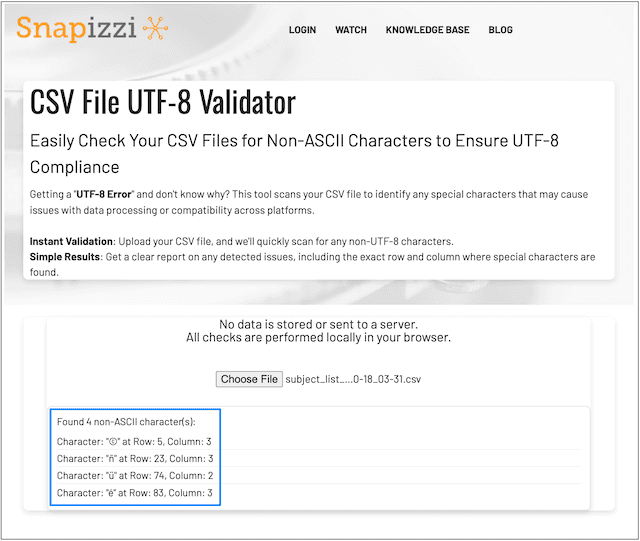
Snapizzi UTF-8 Validator tool for checking CSV files before importing subject data.

The Importance of UTF-8

The Importance of UTF-8

UTF-8 is a widely used character encoding standard that allows text files to represent an enormous range of letters, numbers, symbols, accented characters, and other characters consistently.

Snapizzi requires CSV data files to use UTF-8 encoding.

Most modern spreadsheet applications can create UTF-8 CSV files, but the format used when a file is exported or saved can vary. This is particularly noticeable when subject data contains accented names, special characters, or information copied from another database.

A file can therefore look correct when you open it in a spreadsheet while still containing something that causes a problem when it is processed.

pull-quote-left
pull-quote-left

A CSV file can look completely normal in a spreadsheet while still containing an underlying character or encoding issue.

Find CSV Problems Before They Interrupt Your Workflow

Find CSV Problems Before They Interrupt Your Workflow

If Snapizzi reports a UTF-8 error—or you simply want to check a file before creating a project—you can run it through the Snapizzi UTF-8 Validator.

Upload the CSV file and the validator scans it for potential character issues.

When something is detected, the results can help identify where the problem appears in the file, including the associated row and column. That gives you a much better starting point than searching manually through hundreds or thousands of subject records.

Once you've identified the problem, you can return to your spreadsheet or data-management application, correct the affected information, export the CSV again in UTF-8 format, and continue with your project.

pull-quote-left
pull-quote-left

The Snapizzi UTF-8 Validator checks your file locally in your browser—your CSV data isn't sent to a server for validation.

Your CSV Data Stays in Your Browser

Your CSV Data Stays in Your Browser

Subject rosters can contain information you don't want unnecessarily transmitted to another service.

The UTF-8 Validator performs its checks locally in your browser. Your CSV data isn't uploaded to or stored on a Snapizzi server simply to perform the validation.

That makes it useful for checking a file immediately while keeping the validation process on your own device.

UTF-8 Is Only One Part of Preparing a Good CSV File

UTF-8 Is Only One Part of Preparing a Good CSV File

Encoding is important, but a properly prepared CSV file also needs the right data structure.

Depending on your project, your CSV might include fields for:

  • First and last names

  • Subject IDs

  • Gallery names

  • Grades or teachers

  • Teams or groups

  • Passwords

  • Additional custom subject information

Snapizzi uses this structured subject data to help automate identification, Camera Card creation, image matching, organization, and delivery throughout the high-volume photography workflow.

If you're new to roster-based workflows, How CSV Files Automate Picture Day explains how one properly prepared subject roster can become the foundation for the entire process.

And if you need help structuring your data, the Snapizzi Knowledge Base includes sample CSV files and instructions for splitting or combining CSV columns.

What If the CSV Still Has Problems?

What If the CSV Still Has Problems?

Sometimes the problem isn't UTF-8 encoding.

CSV files assembled from school databases, registration systems, copied spreadsheets, or multiple data sources can contain other inconsistencies, including extra spaces, duplicate records, inconsistent capitalization, or unexpected formatting.

If the validator doesn't identify the problem you're looking for, a data-cleaning application such as OpenRefine can provide additional tools for inspecting and cleaning a complicated dataset.

The goal isn't simply to get a CSV file to import.

It's to start your project with clean, predictable data so the information that follows through the rest of your workflow is accurate.

pull-quote-left
pull-quote-left

A few seconds spent checking your CSV before import can prevent a much larger data problem later in the workflow.

Check Your CSV Before Your Next Project

Check Your CSV Before Your Next Project

The Snapizzi UTF-8 Validator is free to use and doesn't require a Snapizzi account.

Before importing your next school, sports, dance, or high-volume photography roster, run the file through the validator and make sure your data is ready.

Check your CSV with the Snapizzi UTF-8 Validator →

Editor’s note: This article has been updated to provide additional guidance on UTF-8 CSV formatting, troubleshooting, and using the Snapizzi UTF-8 Validator.

Related Help Articles

Step-by-step guides and documentation from the Snapizzi Knowledge Base.

Continue Exploring Snapizzi

Content Directory — Browse all articles and workflow resources

Release History — Explore new features and product updates

Knowledge Base — Find tutorials and documentation

User Love — See how photographers use Snapizzi