What Is a Camera Card in School Photography?

High school student holding a tablet displaying a paperless Data Matrix camera card while making eye contact with the photographer during an outdoor school picture day keyframe capture.

What Is a Camera Card in School Photography?

pull-quote-left

A camera card is the bridge between a student's identity and the photos captured during picture day.

snapizzi-favicon

The Snapizzi Team

Originally published

Today

Updated

Today
5 min read 844 words

What Is a Camera Card in School Photography?

High school student holding a tablet displaying a paperless Data Matrix camera card while making eye contact with the photographer during an outdoor school picture day keyframe capture.

What Is a Camera Card in School Photography?

pull-quote-left

A camera card is the bridge between a student's identity and the photos captured during picture day.

A camera card is the bridge between a student's identity and the photos captured during picture day.

snapizzi-favicon

The Snapizzi Team

Originally published

Today

Updated

Today
5 min read 844 words
snapizzi-favicon

The Snapizzi Team

Originally published

Today

Updated

Today
5 min read 844 words

A camera card is one of the most important tools used during school picture day.

Its purpose is simple: ensure every photo is associated with the correct student. Without a reliable identification system, thousands of images would quickly become disorganized, forcing photographers to spend hours sorting images by hand.
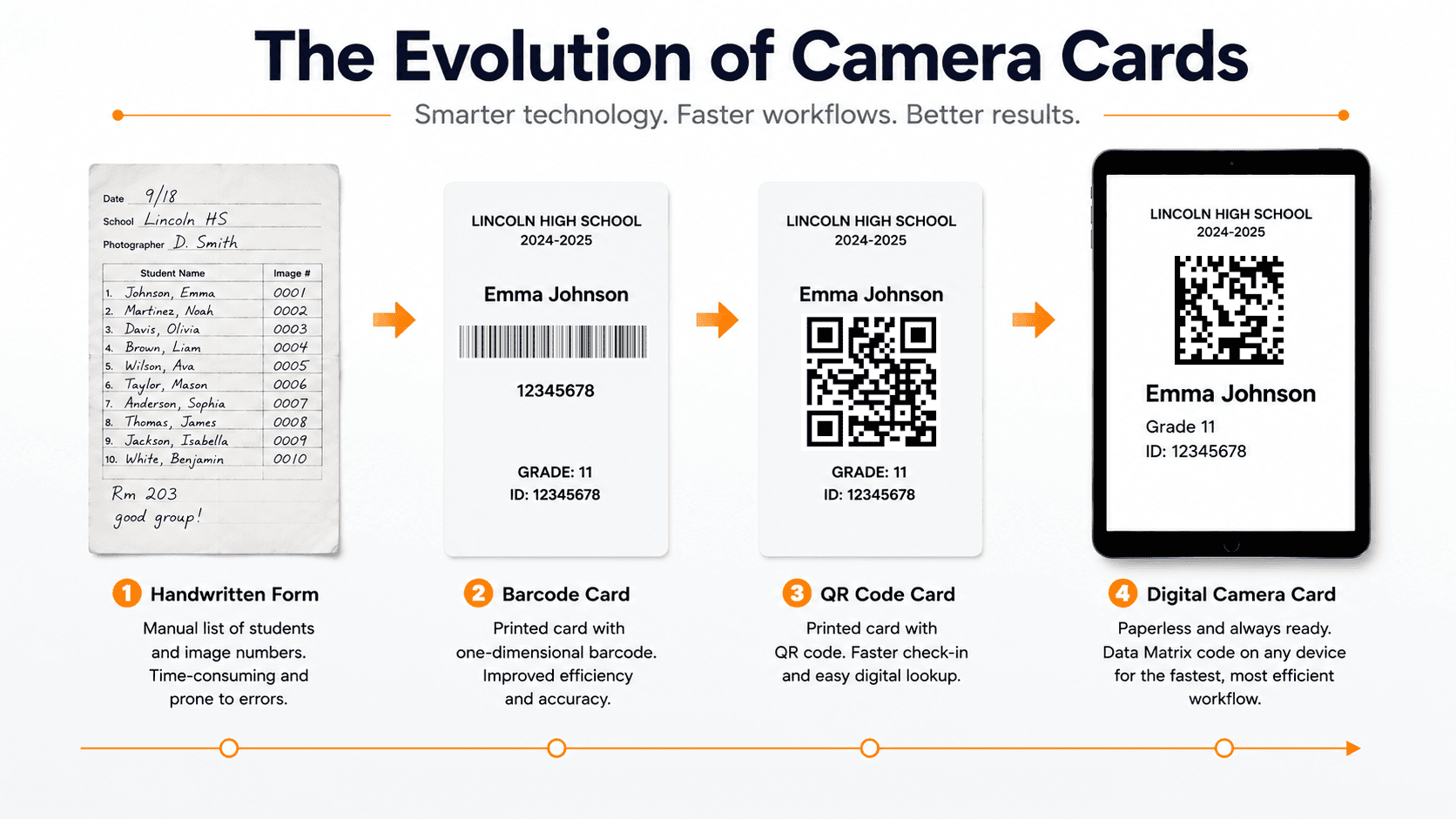
Over the years, camera cards have evolved from handwritten paper forms to sophisticated digital workflows that use barcodes, QR codes, and other two-dimensional (2D) codes. Today, some systems even eliminate paper altogether by displaying camera cards electronically on tablets or smartphones.

In this guide, we'll explain what camera cards are, how they work, and how modern workflows have made school photography faster and more accurate than ever before.


Comparison showing the evolution of school photography camera cards from handwritten paper forms to barcodes, QR codes, and paperless digital workflows.

What Is a Camera Card?

A camera card is an identification card or display that is photographed before taking a student's portrait. It contains information that allows the resulting images to be linked to the correct student record.

Depending on the workflow, a camera card may include:

  • A student's name

  • Student ID number

  • Grade or teacher

  • A barcode or 2D code

  • Order information

  • Other identifying details used by the photography software

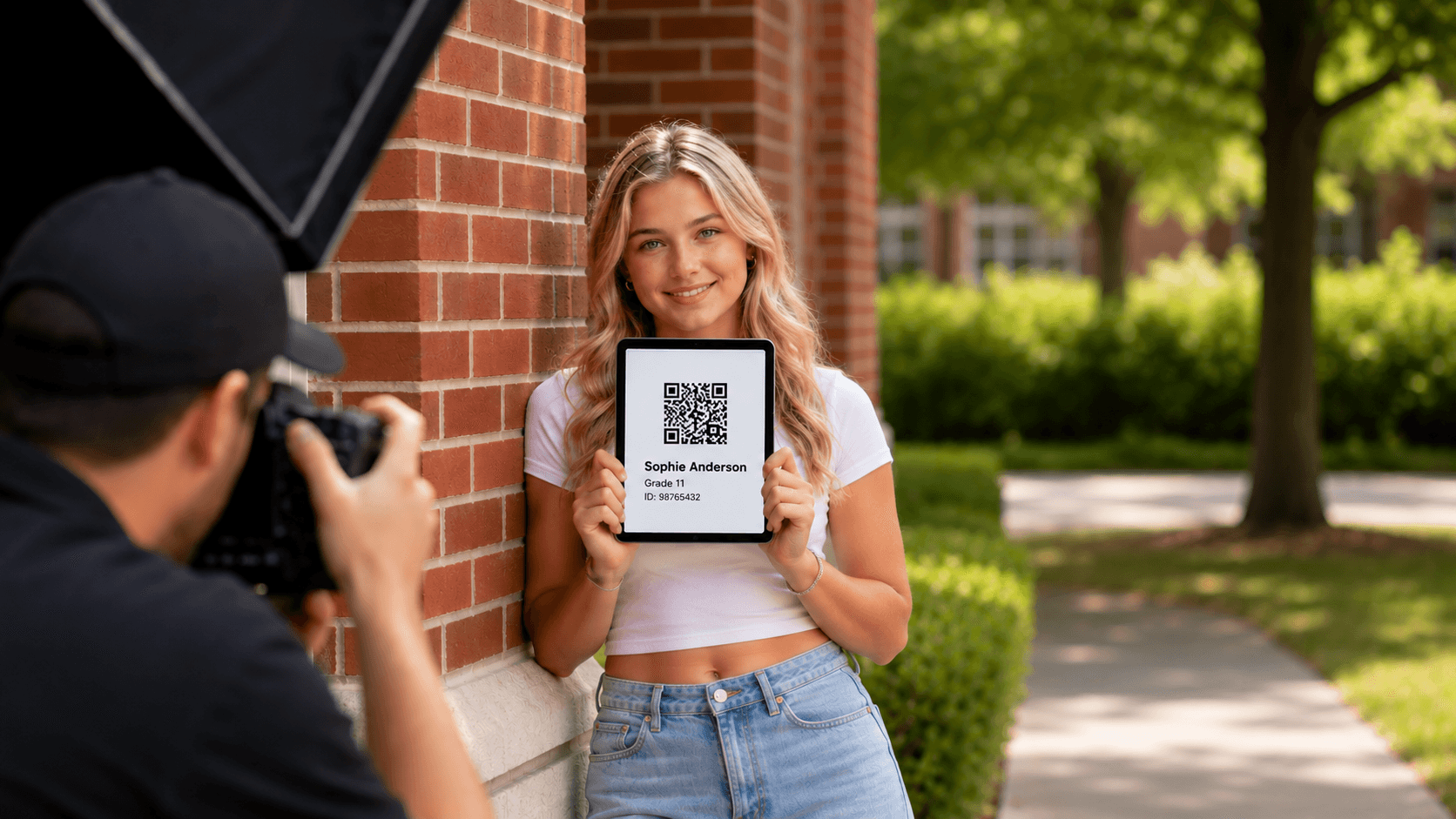
The camera card itself is typically photographed as a keyframe image, creating a reference point that tells software which student the following portraits belong to.


A high school student holding a tablet with a paperless Data Matrix camera card while a photographer captures a keyframe image outdoors.

Traditional Paper Camera Cards

For decades, school photographers relied on printed paper forms that accompanied each student through the photography process.

These cards often included handwritten information or printed order details, and photographers or assistants would manually record image numbers as students were photographed.

While paper camera cards remain effective for smaller jobs, they introduce additional manual work and increase the possibility of transcription errors, misplaced paperwork, or mismatched images when processing large volumes of students.

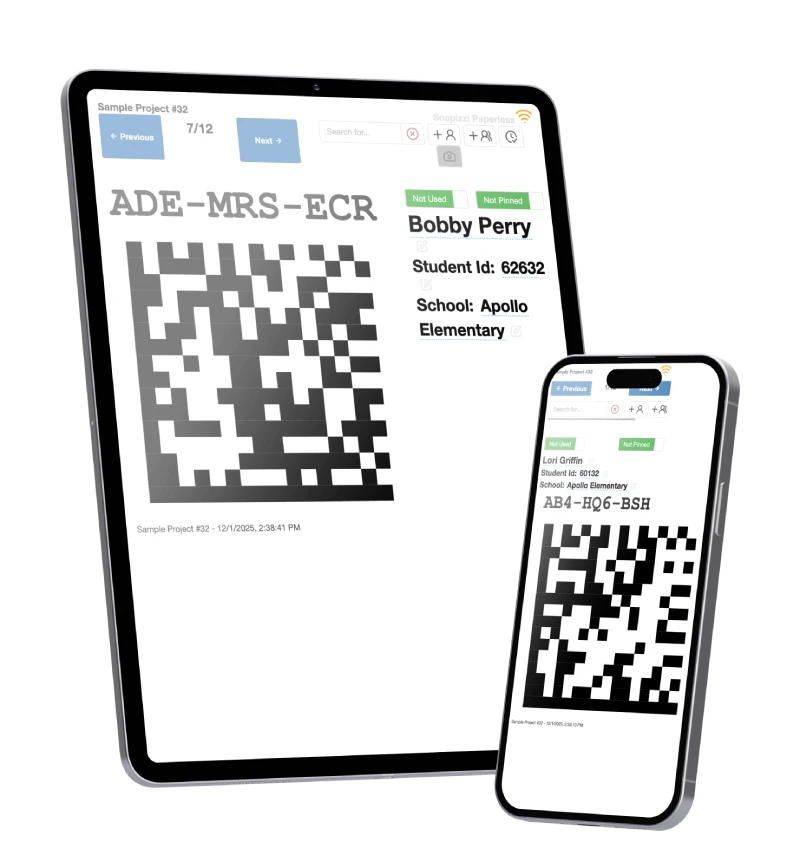
Snapizzi paperless camera cards displayed on an iPad and iPhone, showing digital QR code student identification for school photography workflows.
pull-quote-left

Modern camera cards replace manual note-taking with automated identification, helping photographers save time while improving accuracy.

Barcode Camera Cards

As digital workflows became more common, printed camera cards evolved to include one-dimensional (1D) barcodes.

Instead of relying solely on handwritten information, photographers could photograph or scan a barcode containing a unique identifier linked to the student record. Software would then use that identifier to associate subsequent images with the correct student.

Barcode systems significantly reduced manual data entry and improved consistency, and some organizations continue to use them today.

QR Codes, Data Matrix Codes, and Modern Camera Cards

Modern school photography workflows often use two-dimensional (2D) codes instead of traditional barcodes.

Unlike linear barcodes, which store information in a single direction, 2D codes encode data both horizontally and vertically. This allows substantially more information to fit into a compact symbol while remaining easy for cameras and software to recognize.

Among the many types of two-dimensional codes, the two formats photographers are most likely to encounter are:

  • QR codes, which are widely recognized across many industries.

  • Data Matrix codes, which provide similar functionality in an even smaller footprint and are commonly used in high-volume automated workflows.

A unique code is generated for each student and photographed before the portrait session. That keyframe image acts as a digital marker, allowing software to associate the portraits that follow with the correct student automatically.

Want to understand the technology behind these codes? Read our guide to QR Codes and Data Matrix Codes in School Photography.

pull-quote-left

Whether printed or digital, a camera card serves one purpose: accurately linking students to their portraits.

Paperless Camera Cards

Not every camera card needs to be printed.

Some modern workflows display camera cards electronically on an iPad, tablet, or smartphone. Instead of handing students paper forms, an assistant presents the digital camera card to the photographer, who captures it as the keyframe image before taking the student's portrait.

Paperless camera cards eliminate printing costs, reduce paper handling, simplify updates, and make last-minute roster changes much easier to manage.

Systems such as Snapizzi use this approach by displaying a Data Matrix code electronically, creating a streamlined workflow that integrates directly with student records.

Paperless systems simplify updates and eliminate the need to print and distribute physical camera cards before picture day.

What Is a Keyframe Image?

A keyframe image is the photograph of the camera card itself.

It is captured immediately before the student's portrait and serves as the reference point that connects the student's identity with every image that follows until the next camera card is photographed.

During post-processing, software reads the keyframe and automatically groups the subsequent portraits with the correct student, dramatically reducing the need for manual sorting.

Paper vs. Paperless Camera Cards

Both approaches can be effective, but they offer different advantages.

Paper Camera Cards

Paperless Camera Cards

Printed before picture day

Displayed electronically

May require manual handling

Eliminates physical paperwork

Can include handwritten notes

Easy to update instantly

Susceptible to lost or damaged forms

No printed cards to manage

Suitable for traditional workflows

Well suited for automated, high-volume workflows

The right choice depends on a studio's equipment, workflow preferences, and production volume.

From Paper Cards to Digital Workflows

Camera cards have been a foundational part of school photography for decades because they solve one essential problem: ensuring every student's photos are matched to the correct person.

Although the technology has evolved from handwritten paper forms to barcodes, QR codes, Data Matrix codes, and fully paperless workflows, the objective remains the same—accurately identifying students while reducing manual effort and minimizing errors.

As picture day operations continue to modernize, camera cards remain one of the simplest and most effective tools for keeping high-volume photography organized and efficient.


To learn more about the broader identification process, see How Do School Photographers Match Photos to Students.