Snapizzi Paperless Gets Smarter

paperless-update-01_hero

Snapizzi Paperless Gets Smarter

pull-quote-left

Picture Day data doesn’t always stay exactly as it appeared on the original roster. Paperless makes it possible to update subject information as the workflow is happening.

snapizzi-favicon

The Snapizzi Team

Originally published

9 years ago

Updated

2 days ago
3 min read 513 words

Snapizzi Paperless Gets Smarter

paperless-update-01_hero

Snapizzi Paperless Gets Smarter

pull-quote-left

Picture Day data doesn’t always stay exactly as it appeared on the original roster. Paperless makes it possible to update subject information as the workflow is happening.

Picture Day data doesn’t always stay exactly as it appeared on the original roster. Paperless makes it possible to update subject information as the workflow is happening.

snapizzi-favicon

The Snapizzi Team

Originally published

9 years ago
9 years ago

Updated

2 days ago
2 days ago
3 min read 513 words
snapizzi-favicon

The Snapizzi Team

Originally published

9 years ago

Updated

2 days ago
3 min read 513 words

Picture Day rarely goes exactly according to the original roster.

Students are added. Information changes. Someone arrives who wasn't included in the original data. And when photographers are working from digital Camera Cards, they need to know that the information they're seeing—and the changes they're making—is connected to the main project.

An early Snapizzi update made Paperless Camera Cards significantly more capable on Picture Day.

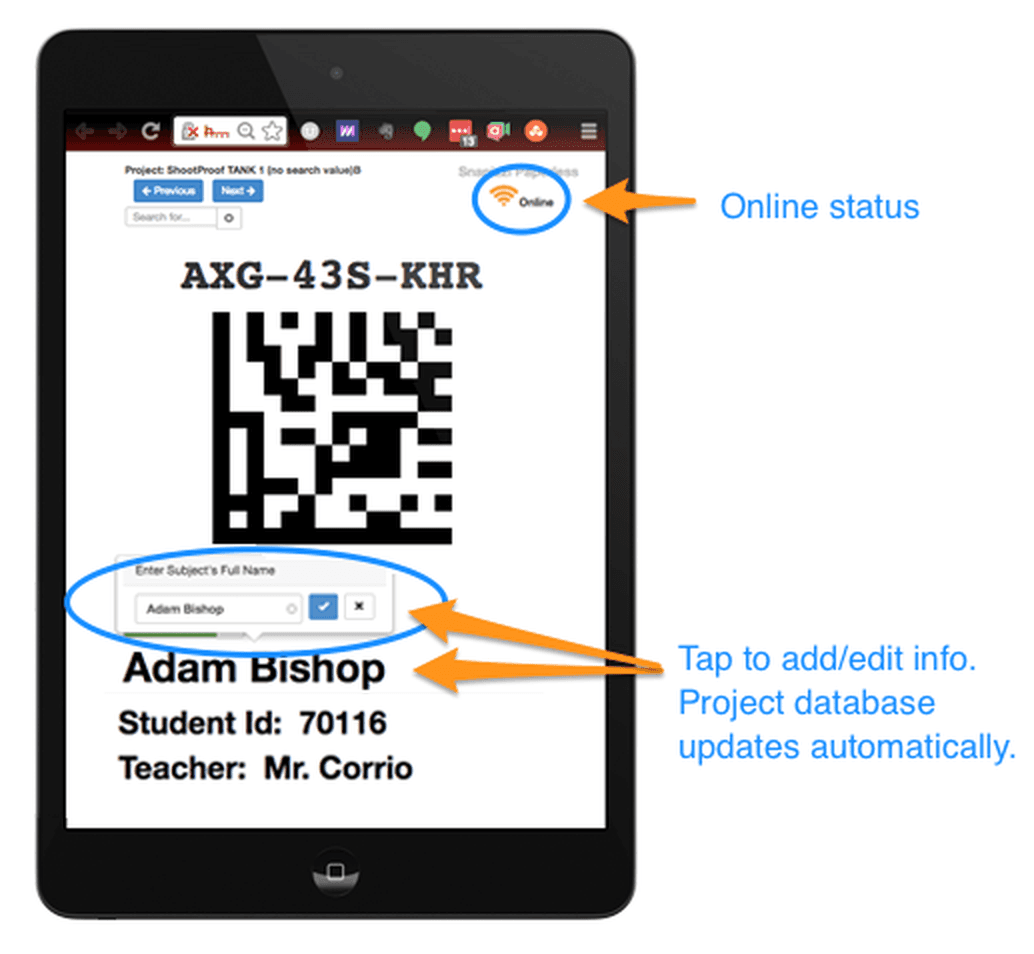
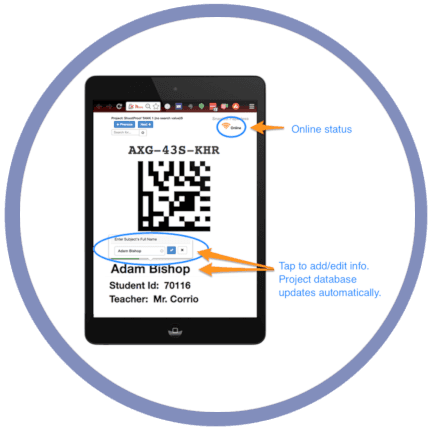
Paperless gained an online status indicator, giving photographers immediate confirmation that their device was connected to Snapizzi. More importantly, photographers could edit subject information directly from Paperless and have those changes sync back to the main Snapizzi project.

That meant corrections and updates could happen where they were often discovered: while working directly with the subject on Picture Day.

The same release also introduced more flexible Paper Proofing, expanding the number of rows and photographs that could appear on a custom proof sheet.

snapizzi-paperless-update

Paperless Becomes a Two-Way Part of the Workflow

Paperless Becomes a Two-Way Part of the Workflow

Paperless Camera Cards gave photographers digital access to the subject information and identification codes they needed on Picture Day.

This update made Paperless more interactive.

Know When Paperless Is Online

An online status indicator was added to Paperless so photographers could immediately see whether their device was connected to Snapizzi.

That provided important feedback in environments where internet connectivity might not always be consistent. Instead of simply assuming Paperless was connected, photographers had a visible indication of its current online status.

Edit Subject Data on the Fly

The bigger improvement was the ability to edit subject information directly from Paperless.

If a photographer discovered that a name, identifier, or other piece of subject information needed to be changed, the correction could be made while working with the subject rather than being saved for cleanup later.

Those changes would then sync back to the subject's record in the main Snapizzi project.

This turned Paperless into more than a digital replacement for a printed Camera Card. Photographers could now work with subject data directly from Paperless while keeping those changes synchronized with the main project.

For high-volume photographers, that matters because the best time to correct inaccurate information is often the moment the problem is discovered—not hours or days later when Picture Day is over.

A More Connected Picture Day Workflow

A More Connected Picture Day Workflow

These improvements removed friction from a common Picture Day challenge: keeping subject information accurate while photographers are actively working with their subjects.

Instead of treating Paperless as a static digital version of a printed Camera Card, Snapizzi provided photographers with current project information while allowing corrections made in Paperless to flow back to the project.

That idea has continued throughout Snapizzi's development.

Paperless has evolved into a flexible Picture Day tool with searching, editing, syncing, Pinning, and other workflow capabilities designed to keep photographers connected to the subject information they need.

The capabilities have evolved considerably since this original release, but the goal remains the same: keep subject information accessible and accurate while reducing the manual work required during and after Picture Day.

Learn more about building a more efficient Picture Day workflow, from subject data and identification through image matching and delivery.

Editor's Note: The Paperless improvements in this article were originally announced as part of a January 2017 Snapizzi product update alongside expanded Paper Proofing capabilities. This article has been updated and expanded from that original announcement while preserving its historical context.

Related Articles

Explore more features, announcements, and workflow improvements.

Related Help Articles

Step-by-step guides and documentation from the Snapizzi Knowledge Base.

Continue Exploring Snapizzi

Content Directory — Browse all articles and workflow resources

Release History — Explore new features and product updates

Knowledge Base — Find tutorials and documentation

User Love — See how photographers use Snapizzi