


Preparing for Picture Day involves a lot of moving parts. Student data needs to be ready, projects need to be configured, and Camera Cards need to be available before the first subject steps in front of the camera.
Snapizzi's Quick Access to Camera Cards makes one of those routine tasks a little faster.
Instead of returning to the Project Dashboard before generating Camera Cards, photographers can now open the Camera Card generator directly with a single click.

For photographers using Snapizzi Paperless, Camera Cards can be accessed without first opening the individual project.
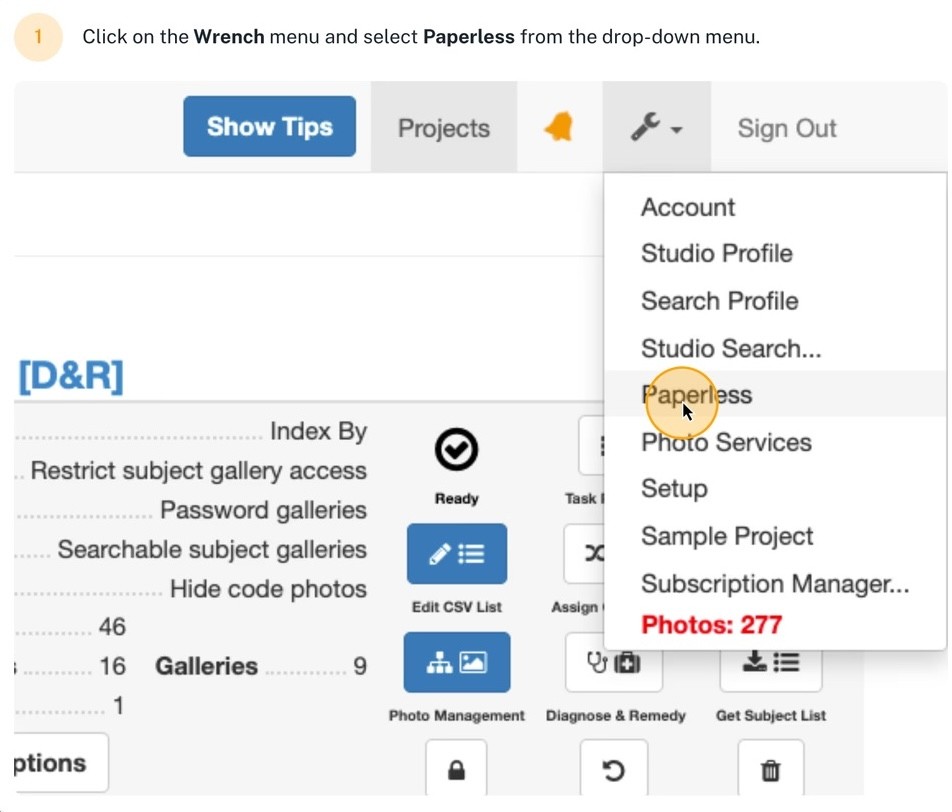
From the Paperless project selector, you can quickly find the project you're working with and open its Paperless Camera Cards directly.
This is especially useful on Picture Day when you're moving between multiple schools, teams, groups, or photography stations and need to get to the correct cards quickly.
The goal is simple: less navigation between you and the tool you're trying to use.

Camera Cards are also readily accessible while you're already working inside a project.
That means you don't have to continually return to the main Project Dashboard just because you need to generate or retrieve cards.
It's a relatively small change to the interface, but those small changes matter when you're repeating the same workflow across hundreds or thousands of subjects.

The best workflow improvements aren't always the biggest features. Sometimes they're simply about removing unnecessary steps.
Snapizzi Camera Cards aren't limited to a single format.
You can generate traditional Camera Cards for printing or use Snapizzi Paperless to display cards electronically on a tablet, smartphone, laptop, or other supported device.
You can even use printed and Paperless Camera Cards within the same project.
Whichever method you choose, Camera Cards perform the same fundamental job: creating the identification point Snapizzi uses to connect subjects with the photographs that follow.
For photographers looking to eliminate printing and simplify Picture Day logistics, Paperless provides the additional advantage of fast subject search and digital access to project cards.
Quick Access to Camera Cards is intentionally simple.
It doesn't change how Camera Cards work. It makes getting to them easier.
For a photographer preparing one small project, saving a few clicks might not seem significant. Across multiple projects, multiple photographers, and an entire season of high-volume photography, those repetitive actions add up.
That's why we continue looking for places throughout Snapizzi where we can remove unnecessary navigation and keep the workflow moving.
Because when you're photographing hundreds or thousands of people, every step you don't have to take is time you get back.
Good workflow automation isn't only about automating big processes. It's also about eliminating the small interruptions that slow you down.
Camera Cards are one of the foundations of the Snapizzi workflow, connecting subject identification with automated photo matching and organization.
If you're new to the process, start with What Is a Camera Card in School Photography? to understand how Camera Cards work, or explore What Is Paperless School Photography? to see how digital Camera Cards can simplify Picture Day.
Ready to see the complete workflow in action? Try Snapizzi free for 14 days and discover a faster way to organize high-volume photography.
Note: Quick Access to Camera Cards was originally introduced as a workflow improvement designed to reduce navigation when preparing projects. The feature remains part of today’s Snapizzi workflow.
Related Articles
Explore more features, announcements, and workflow improvements.
Related Help Articles
Step-by-step guides and documentation from the Snapizzi Knowledge Base.
Explore These Topics
Find more articles on the topics covered in this post.
Continue Exploring Snapizzi
Content Directory — Browse all articles and workflow resources
Release History — Explore new features and product updates
Knowledge Base — Find tutorials and documentation
User Love — See what photographers say about Snapizzi