


Publishing thousands of photographs involves many moving parts, and even experienced photographers can occasionally overlook a step in their workflow.
The Diagnose & Remedy Tool helps identify common project issues automatically, while the Activity Log provides a detailed history of project activity to simplify troubleshooting and improve workflow visibility.
Together, these tools help photographers spend less time searching for problems and more time completing successful projects.
The Diagnose & Remedy Tool scans your project for many of the most common issues photographers encounter while using Snapizzi.
Rather than manually checking every part of your workflow, Snapizzi automatically analyzes your project and alerts you when something requires attention.
This proactive approach helps identify potential problems before they affect your published galleries.
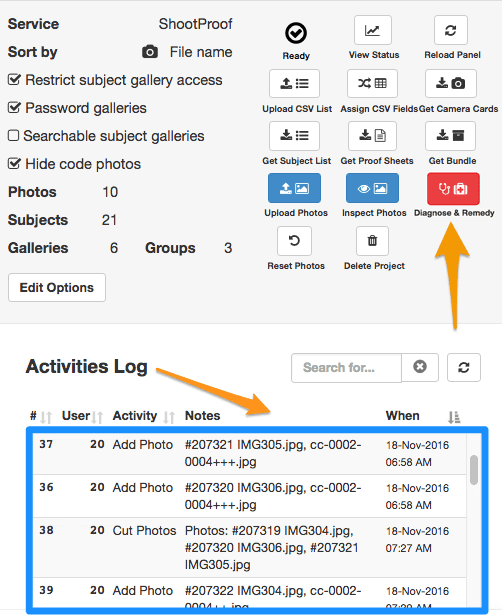
When an issue is detected, the Diagnose & Remedy Tool provides information about the problem along with guidance for resolving it.
Instead of wondering why something isn't working correctly, photographers receive clear feedback that helps them quickly identify the next step.
By reducing guesswork, the tool helps minimize downtime during busy photography seasons.
The Activity Log records important actions performed within each project, creating a chronological history of your workflow.
This makes it easier to:
Review recent project activity.
Understand what changes have been made.
Troubleshoot unexpected behavior.
Confirm that important workflow steps were completed.
Having a complete activity history is especially valuable when managing large projects or collaborating with other team members.
When questions arise, the combination of automatic diagnostics and project history provides valuable insight into what happened and when.
Instead of relying on memory or manually retracing each step, photographers can review diagnostic results alongside the Activity Log to identify issues more efficiently.
This helps reduce delays while improving confidence throughout the workflow.
Large photography projects often involve thousands of images, multiple workflows, and numerous publishing steps.
Whether you're photographing:
Schools
Youth sports
Dance studios
Preschools
Graduation ceremonies
Special events
the Diagnose & Remedy Tool and Activity Log help maintain consistency while reducing the time spent troubleshooting.
The Diagnose & Remedy Tool and Activity Log complement Snapizzi’s broader photography workflow automation features.
Used alongside tools such as the Remote Gallery Health Report, Project Search Pages, and View Mode, they provide additional visibility into every stage of the photography workflow—from importing photographs to publishing completed galleries.
Together, these tools help photographers identify issues earlier, resolve problems faster, and maintain confidence throughout even the busiest photography season.
We're always looking for ways to improve Snapizzi. If you have feedback or questions, we'd love to hear from you.
Note: This article was originally published when the Diagnose & Remedy Tool and Activity Log were introduced. It has been updated to reflect the current Snapizzi platform while preserving the historical context of the original announcement.
Related Articles
Explore more features, announcements, and workflow improvements.
Related Help Articles
Step-by-step guides and documentation from the Snapizzi Knowledge Base.
Explore These Topics
Find more articles on the topics covered in this post.
Continue Exploring Snapizzi
Content Directory — Browse all articles and workflow resources
Release History — Explore new features and product updates
Knowledge Base — Find tutorials and documentation
User Love — See what photographers say about Snapizzi