


If you use Pixnub to create composites, memory mates, class photos, or virtual teams, you already know that organizing and matching images can become one of the most time-consuming parts of the workflow.
Snapizzi helps automate the image matching and organization process so you can continue using Pixnub while spending less time sorting photos and more time creating finished products.
Looking for step-by-step setup instructions? See our Snapizzi + Pixnub Workflow Guide for detailed setup instructions, workflow recommendations, and best practices.

Pixnub is software used by school and sports photographers to create memory mates, class composites, virtual teams, and other personalized photo products. The platform helps streamline production by using subject data and matched images to automatically generate finished designs, reducing the amount of manual editing required.
When paired with Snapizzi, photographers can automate both the image matching process and the creation of composite products, creating a more efficient end-to-end workflow.

Creating memory mates, class composites, virtual teams, and sports products requires more than great photography. Before a composite can be generated, every image must be correctly matched to the right subject.
For small jobs, this process may only take a few minutes. For schools, sports leagues, dance studios, and large events, however, manually sorting and identifying hundreds or thousands of images can quickly become one of the most time-consuming parts of the production workflow.
A single mismatch can result in incorrect composites, rework, customer service issues, and delayed deliveries. As job volumes increase, the need for an organized workflow becomes even more important.
By automating photo matching and organization before images reach Pixnub, photographers can significantly reduce manual work and improve consistency across every job.
Understanding the complete picture day process can help you build a more efficient workflow.
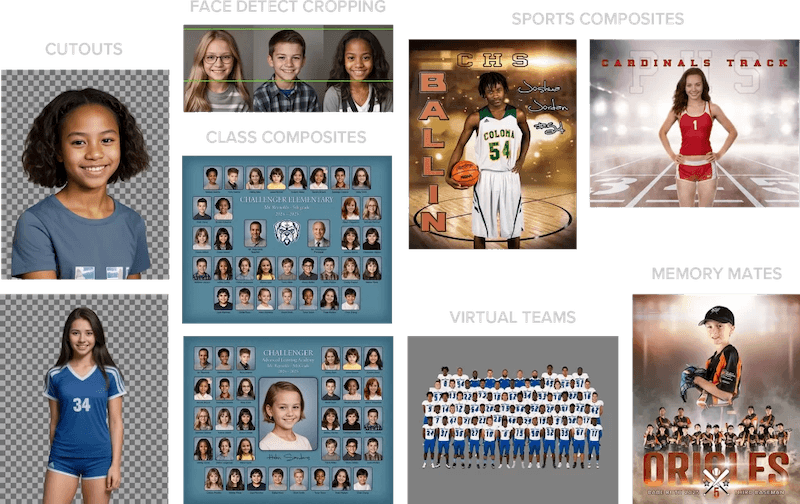
Whether you're creating memory mates, class composites, virtual teams, or sports products, automating the organization process can save hours on every job.
Using Snapizzi with Pixnub is straightforward:
Photograph subjects using Snapizzi QR codes or roster-based workflows.
Snapizzi automatically matches and organizes images by subject.
Export your organized images and subject data.
Import the Pixnub CSV into Snapizzi and complete the matching process.
Use Pixnub to generate memory mates, class composites, virtual teams, sports graphics, and other personalized products.
Because the matching process has already been completed, photographers can move directly into product creation without spending hours manually sorting images.
The Snapizzi and Pixnub workflow is particularly valuable for photographers handling large numbers of subjects and high-volume jobs.
Common use cases include:
School portraits
Class composites
Sports leagues and tournaments
Dance and performing arts studios
Graduation photography
Camps and youth organizations
Virtual team photos
Memory mates and specialty products
Because Snapizzi automatically matches images to subject data during the photography process, photographers can spend less time managing files and more time focused on production and delivery.
The larger the job, the more valuable automation becomes. Eliminating manual image matching can save hours of production time on every school or sports event.
Snapizzi and Pixnub solve different parts of the high-volume photography workflow.
Snapizzi focuses on identifying, organizing, and matching images to the correct subjects. Pixnub focuses on transforming those organized images into finished products such as memory mates, class composites, sports graphics, and virtual teams.
Together, they help photographers:
Reduce manual image sorting
Minimize data-entry errors
Eliminate spreadsheet cleanup
Process large jobs more efficiently
Create composite products faster
Maintain organized subject data
Continue using existing platforms and workflows
Rather than replacing your existing workflow, Snapizzi enhances it by automating one of the most repetitive and time-consuming parts of the process.
Whether you're creating memory mates, class composites, virtual teams, or sports products, automating the organization process can save hours on every job.
By combining Snapizzi's automated photo matching with Pixnub's composite production tools, photographers can create a scalable workflow that helps reduce manual labor, improve accuracy, and speed up delivery times.
For studios handling hundreds or thousands of subjects, even small workflow improvements can result in significant time savings throughout the year.
Learn more about how schools and sports photographers automate image matching in our article: How Do School Photographers Match Photos to Students?
Ready to Streamline Your Workflow?
Snapizzi helps photographers automate photo matching, organization, and delivery while continuing to use the platforms they already trust.
See how photography studios use Snapizzi to reduce manual work, improve organization, and streamline high-volume photography workflows in our Customer Success Stories.
Start your free 14-day trial and see how much time you can save on your next school, sports, or high-volume photography job.
Related Workflow Guides
*Pixnub is a trademark of its respective owner. Snapizzi works with Pixnub to help automate high-volume photography workflows.
Related Articles
Explore more features, announcements, and workflow improvements.
Related Help Articles
Step-by-step guides and documentation from the Snapizzi Knowledge Base.
Explore These Topics
Find more articles on the topics covered in this post.
Continue Exploring Snapizzi
Content Directory — Browse all articles and workflow resources
Release History — Explore new features and product updates
Knowledge Base — Find tutorials and documentation
User Love — See what photographers say about Snapizzi