

When photographing public events, speed matters.
Stopping every customer to collect names, phone numbers, or email addresses slows the photography experience and creates unnecessary work afterward.
When photographing public events, speed matters.
Stopping every customer to collect names, phone numbers, or email addresses slows the photography experience and creates unnecessary work afterward.
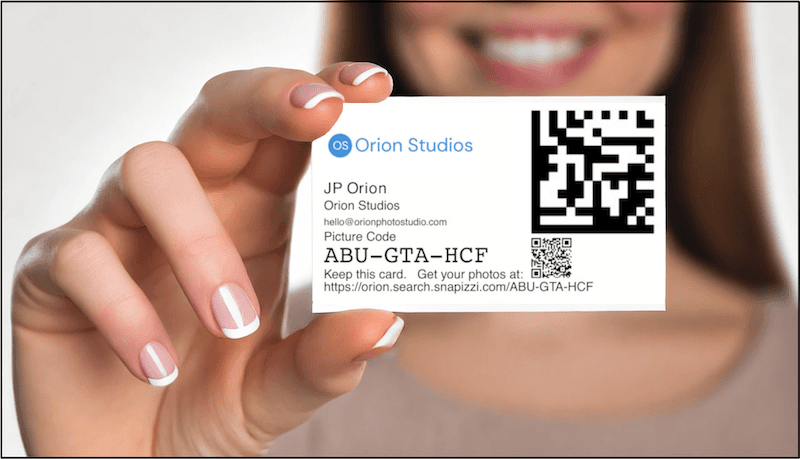
Snapizzi Event Projects solve this by giving every customer a unique identification card that connects their photographs to a private online gallery. After the session, customers simply scan the QR code printed on their card to go directly to their gallery and view their photos.
The Event Project workflow is designed to be fast.
Before photographing a customer, the photographer captures the Event Card. After the session, that same card is handed to the customer.
When the images are uploaded, Snapizzi automatically associates every photograph with that unique card, creating a private gallery without requiring customer information beforehand.
One quick scan takes customers directly to their online gallery.
Every Event Card includes a QR code that takes customers directly to their online gallery.
Rather than remembering a web address or manually entering a picture code, customers simply scan the code with their smartphone to immediately view their photographs.
This creates a faster, more convenient experience while reducing customer support requests.
Event Projects are ideal whenever subjects are not known before photography begins.
Typical applications include:
Festivals
Community events
Holiday portrait events
Theme parks
Santa photography
Easter Bunny photography
Fundraisers
Walk-up portrait stations
Because no roster is required, photographers can keep people moving while still providing every customer with a simple way to find their photographs later.
The QR code is a small addition that makes a significant difference.
Instead of asking customers to type a long URL or search through thousands of photographs, Event Cards provide immediate access to the correct gallery with a single scan.
It's a faster experience for customers, reduces support requests for photographers, and helps ensure every customer reaches the right gallery quickly and easily.
Note: This article was originally published when QR codes were added to Snapizzi Event Cards. It has been updated to reflect the current platform while preserving the historical significance of this workflow enhancement. Snapizzi has always used Data Matrix codes to identify and automatically match photographs. This update added a QR code to Event Cards, giving customers a simple way to scan the card and go directly to their online gallery.
Related Articles
Explore more features, announcements, and workflow improvements.
Related Help Articles
Step-by-step guides and documentation from the Snapizzi Knowledge Base.
Explore These Topics
Find more articles on the topics covered in this post.
Continue Exploring Snapizzi
Content Directory — Browse all articles and workflow resources
Release History — Explore new features and product updates
Knowledge Base — Find tutorials and documentation
User Love — See what photographers say about Snapizzi