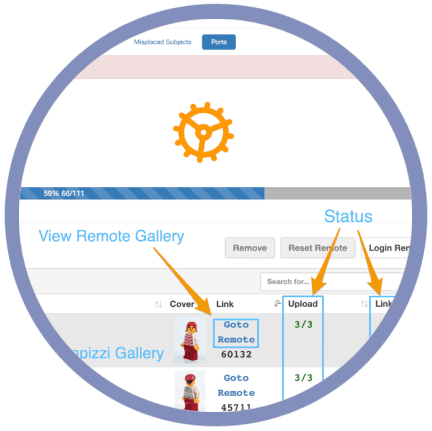


Publishing thousands of photographs across multiple galleries can make it difficult to know whether every upload completed successfully.
Rather than guessing or manually checking every gallery, the Remote Gallery Health Report provides a centralized view of your gallery status, making it easy to identify completed uploads, detect potential issues, and take action when needed.
Whether you're managing a single school or an entire season of projects, the Remote Gallery Health Report helps you understand exactly where every gallery stands.
The Remote Gallery Health Report gives you a comprehensive overview of every remote gallery associated with your project.
Instead of checking galleries one at a time, you can quickly see which galleries are complete, which are still updating, and which may require attention.
This allows you to spend less time investigating uploads and more time focusing on your photography business.
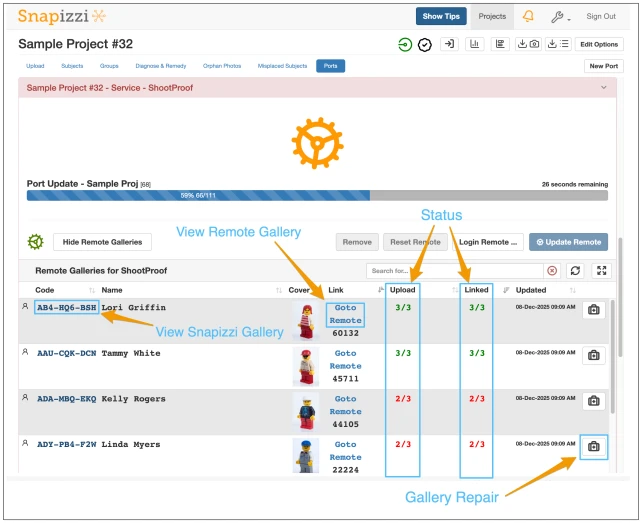
The Remote Gallery Health Report provides a centralized view of every gallery associated with your project, making it easy to monitor progress without opening each gallery individually.
From a single screen, you can quickly see:
Every gallery created for your project
Whether each gallery was created successfully
Upload and link counts for every gallery
When Snapizzi detects missing or incomplete uploads
Direct links to both the Snapizzi gallery and the remote gallery
Access to the Gallery Repair Tool without leaving your workflow
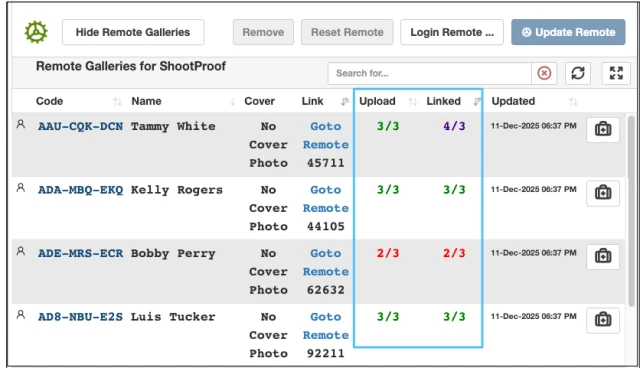
To help you identify the status of each gallery even faster, the Remote Gallery Health Report uses clear color-coded indicators.
Gallery Status Colors
🟢 Green — Complete
The gallery has been successfully created and all expected uploads and links have been completed.
🔴 Red — Not Completed
The gallery requires attention. One or more uploads, links, or gallery operations did not complete successfully.
🟣 Indigo — Reconciliation in Progress
Snapizzi is comparing your project with the remote gallery to verify that every image, upload, and gallery record matches. This status is temporary and updates automatically when reconciliation is complete.
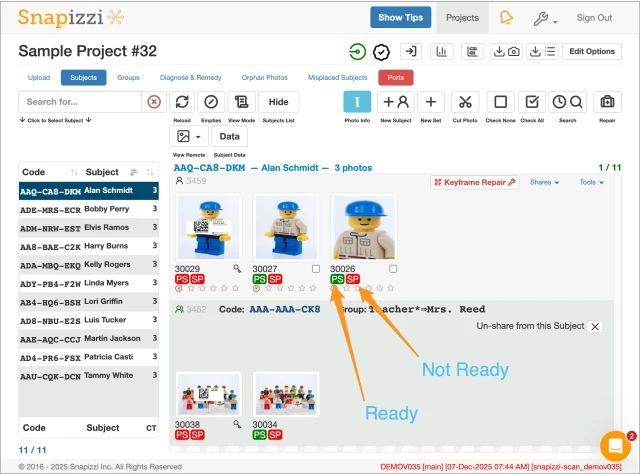
Know the status of every gallery before your customers do.
Sometimes only a few photographs require attention.
The Remote Gallery Health Report doesn't stop at the gallery level—it also provides photo-level status information, allowing you to quickly identify individual images that may still be uploading, require relinking, or need additional attention.
Instead of manually inspecting thousands of photographs, you can immediately see which images need review and which have been successfully processed.
This additional visibility helps photographers troubleshoot specific issues without manually reviewing every image in the gallery.
Large photography projects often involve thousands of images spread across dozens—or even hundreds—of galleries.
The Remote Gallery Health Report helps photographers identify potential issues before parents, students, coaches, or clients encounter them.
Having visibility into the health of every gallery provides greater confidence before sharing search pages, gallery links, or online ordering information.
When a gallery requires attention, the Remote Gallery Health Report works alongside Snapizzi's repair tools to help you resolve issues efficiently.
With direct access to the Gallery Repair Tool, you can quickly investigate incomplete uploads, synchronization issues, or missing images without recreating the entire gallery.
Instead of starting over, Snapizzi helps you identify exactly where attention is needed so you can resolve problems faster.
The Remote Gallery Health Report was designed specifically for photographers managing large projects.
Whether you're photographing:
Schools
Youth sports
Dance studios
Preschools
Graduation ceremonies
Special events
the ability to monitor gallery health from a single location helps reduce uncertainty and improve workflow efficiency throughout the publishing process.
The Remote Gallery Health Report brings together everything you need to monitor your published galleries from a single location.
With built-in visibility into gallery creation, upload progress, linking status, photo-level diagnostics, and repair tools, you can quickly verify that your projects are complete—or immediately identify where attention is needed.
Whether you're publishing a handful of galleries or managing thousands of images across an entire photography season, the Remote Gallery Health Report provides the confidence to know exactly what's happening throughout the publishing process.
We're always looking for ways to improve Snapizzi. If you have feedback or questions, we'd love to hear from you.
Note: This article was originally published when the Remote Gallery Health Report was introduced. It has been updated to reflect the current Snapizzi platform while preserving the historical context of the original announcement.
Related Articles
Explore more features, announcements, and workflow improvements.
Related Help Articles
Step-by-step guides and documentation from the Snapizzi Knowledge Base.
Explore These Topics
Find more articles on the topics covered in this post.
Continue Exploring Snapizzi
Content Directory — Browse all articles and workflow resources
Release History — Explore new features and product updates
Knowledge Base — Find tutorials and documentation
User Love — See what photographers say about Snapizzi