How Do School Photographers Match Photos to Students?

Traditional school picture day workflow showing a photography assistant holding a printed student order form and writing image numbers by hand while a student poses for a portrait and the photographer captures the session in a professional studio.

How Do School Photographers Match Photos to Students?

pull-quote-left


Every school photography workflow depends on one critical task: making sure every photo ends up attached to the right student.


snapizzi-favicon

The Snapizzi Team

Originally published

2 days ago

Updated

2 days ago
4 min read 697 words

How Do School Photographers Match Photos to Students?

Traditional school picture day workflow showing a photography assistant holding a printed student order form and writing image numbers by hand while a student poses for a portrait and the photographer captures the session in a professional studio.

How Do School Photographers Match Photos to Students?

pull-quote-left


Every school photography workflow depends on one critical task: making sure every photo ends up attached to the right student.


Every school photography workflow depends on one critical task: making sure every photo ends up attached to the right student.


snapizzi-favicon

The Snapizzi Team

Originally published

2 days ago

Updated

2 days ago
4 min read 697 words
snapizzi-favicon

The Snapizzi Team

Originally published

2 days ago

Updated

2 days ago
4 min read 697 words

Whether a photographer is photographing 200 students or 20,000, every image must eventually be matched to a student's name, grade, teacher, or other identifying information before galleries can be delivered and orders can be placed.

Taking the photos is the easy part. The real challenge begins afterward—making sure every image is connected to the correct student.

Method 1: Manual Matching

Before digital workflows became common, many school photographers relied on manual processes to connect photos with the correct students. While the exact workflow varied from studio to studio, it often included steps like:

  • Photographing each student

  • Recording image numbers on a printed order form or roster

  • Writing notes by hand during picture day

  • Manually entering or verifying data after the event

  • Sorting and organizing image files before delivery

For smaller jobs, this approach can be effective and requires very little technology. However, as the number of students increases, manual matching becomes more time-consuming and more susceptible to mistakes. Tracking thousands of images by hand can slow production, make quality control more difficult, and create additional work before galleries are ready for delivery.

As school photography has evolved, most professional studios have adopted automated identification methods that reduce manual effort and improve matching accuracy.


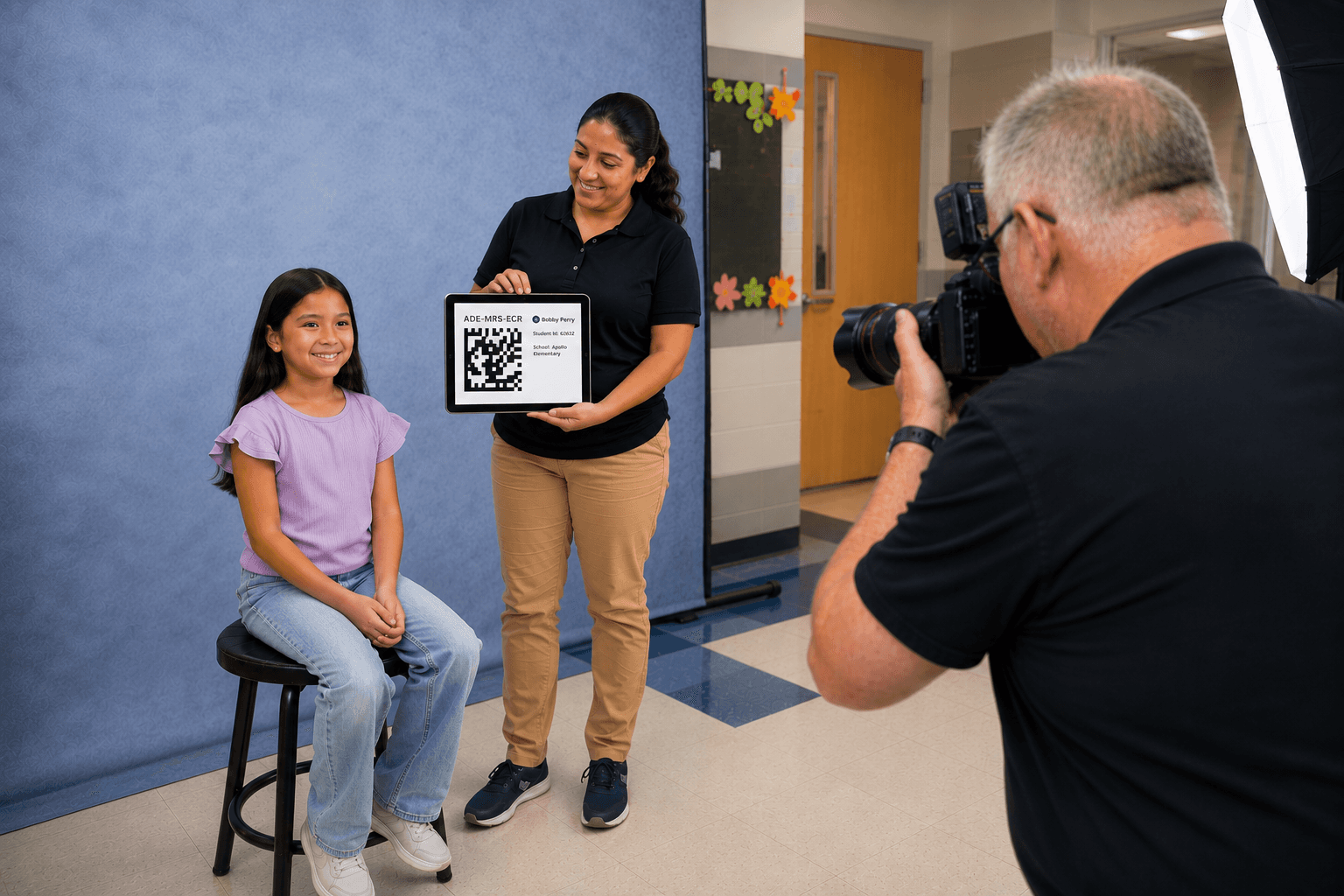
Photography assistant holding an iPad displaying a QR code beneath a student while a school photographer captures a keyframe image during picture day.

Method 2: Automated Matching Systems

Today, most school photographers rely on automated identification systems that reduce manual work and improve accuracy. While every studio operates differently, the most common approaches include:

Barcode Systems

Before two-dimensional codes became common, school photography companies commonly used one-dimensional (1D) barcodes printed on camera cards. These linear barcodes encode a unique identifier that software uses to retrieve the corresponding student record.

Barcode-based workflows are still used by some organizations today, but they generally store less information than newer two-dimensional codes and require more horizontal space.

QR Code and Data Matrix Workflows

Today, two-dimensional (2D) codes are among the most widely used identification methods in school photography. Unlike traditional barcodes, they store information both horizontally and vertically, allowing substantially more data to be encoded in a compact symbol.

A unique code is assigned to each student and photographed before the portrait session. That keyframe links the images that follow to the correct student record, providing a fast and reliable way to automate photo matching.

Although QR codes are the best-known type of 2D code, systems such as Snapizzi use Data Matrix codes, which provide similar capabilities in an even smaller footprint and are well suited for high-volume photography workflows.

Facial Recognition and AI Matching

Some photography platforms use facial recognition technology to identify students across multiple images. These systems analyze facial features to assist with matching and gallery organization, typically serving as a supplemental verification tool rather than the primary identification method.

Hybrid Workflows

Photography businesses often combine multiple identification techniques to maximize accuracy. For example, a workflow might use barcodes or 2D codes during picture day while relying on facial recognition or manual review to verify matches and resolve exceptions.


pull-quote-left


Today, two-dimensional (2D) codes are among the most widely used identification methods in school photography. Unlike traditional barcodes, they store information both horizontally and vertically, allowing substantially more data to be encoded in a compact symbol.


Conclusion

Matching photos to students is one of the most important parts of any school photography workflow.

Over the years, photographers have used everything from handwritten rosters and barcode cards to QR code systems and facial recognition to solve this challenge. While the technology continues to evolve, the objective remains the same: ensure every student receives the correct photos while minimizing manual work.

Modern identification methods—including QR codes, barcode systems, facial recognition, and hybrid workflows—allow photographers to process high volumes of images more efficiently, reduce errors, and deliver galleries faster than ever before.


Want to dive deeper into modern identification methods? Read our guide to two-dimensional codes in school photography to learn how these technologies simplify picture day and improve matching accuracy.