

Snapizzi is constantly evolving, and this release brings several improvements designed around one central goal: making high-volume photography workflows easier to monitor, manage, and troubleshoot.
The biggest changes focus on remote galleries and give photographers much greater visibility into what happens after a project is sent from Snapizzi to a connected gallery platform.
We’ve also improved Paperless, refreshed parts of the interface, continued developing Smart Keyframe, and made numerous behind-the-scenes improvements to remote platform communication.
Here’s what’s new.
When you’re publishing thousands of photographs across hundreds or even thousands of galleries, knowing that a process started isn’t enough. You need to know what actually happened.
The Remote Gallery Health Report provides a detailed view of gallery creation, photo uploads, and gallery linking across supported remote platforms.
From the Ports view, you can quickly see whether galleries were created successfully, monitor upload progress, identify linking problems, and access repair tools when something needs attention.
Instead of checking your remote platform manually to confirm that everything arrived where it belongs, Snapizzi gives you that information directly within your workflow.
Learn more: Remote Gallery Health Report →

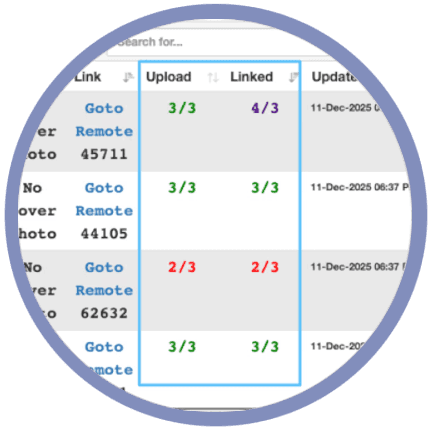
The Remote Gallery Health Report also introduces color-coded status signals that make large projects easier to evaluate at a glance.
Green indicates that an item is complete.
Red identifies something that has not been completed and may require attention.
Indigo indicates that Snapizzi is actively reconciling information, which can occur while larger batches are being processed or when photographs belong to multiple galleries.
These signals make it much easier to distinguish between something that needs attention and something Snapizzi is still actively processing.
🟢 Green = Complete
🔴 Red = Not completed
🟣 Indigo = Reconciliation in Progress
Learn more: Status Count Color Signals →

Snapizzi also displays remote status indicators beneath individual photographs, providing another level of visibility when reviewing a project.
Every photo now displays a remote status badge showing upload and linking status for ShootProof (SP), PhotoShelter (PS), Zenfolio (ZF), or PhotoDeck (PD). This makes it easy to spot issues before a project goes live, not after.
Green means the photograph is complete.
Red indicates that the remote process has not been completed.
Orange means the photograph has been uploaded but has not yet been linked to its destination gallery.
🟢 Green = Complete
🔴 Red = Not completed
🟠 Orange = Uploaded, Not Yet Linked
These per-photo signals complement the Remote Gallery Health Report, giving you two levels of visibility: gallery-level and image-level. Together, they make troubleshooting faster, eliminate guesswork, and help support diagnose issues more accurately when screenshots are shared.
Learn more: Photo-Level Remote Status Badges →


Snapizzi Paperless is often used on phones and tablets during fast-moving picture days, so small interface improvements can make a meaningful difference.
The Paperless toolbar now scrolls horizontally on narrow screens.
Instead of compressing controls or pushing buttons out of view, you can simply swipe across the toolbar to reach additional actions.
It’s a relatively small change, but one designed specifically around how photographers and assistants actually use Paperless in the field.
Learn more: Snapizzi Paperless →
We’ve also refreshed interface elements throughout Snapizzi with a cleaner Lucide-based icon system.
The updated icons improve consistency and make controls easier to recognize while keeping the interface uncluttered.
Several workflow behaviors were refined at the same time. Cover photo handling for example, now waits for confirmation from the connected platform before displaying the completed update, helping prevent temporary mismatches between Snapizzi and the remote gallery.
Port actions have also been improved to behave more consistently, particularly when processing larger projects.

What was originally introduced as Magic Keyframe is now Smart Keyframe a name that better describes what the feature does.
Smart Keyframe allows photographers to create keyframes without photographing a traditional Snapizzi identification code.
Instead, the workflow uses precise timing information to determine where a new subject or group begins.
The feature has continued to improve through testing on real high-volume photography jobs, with refinements to timing, sequence handling, and error detection.
Smart Keyframe remains an authorized feature and has specific workflow requirements, but it represents another way we're exploring how picture-day identification can become faster while preserving the automated organization that happens afterward.
Contact us to have this feature enabled on your account.
Learn more: Smart Keyframe →
Some of the most important improvements in this release aren't necessarily the ones you can see.
We've made numerous changes to the way Snapizzi communicates with connected gallery platforms.
Remote APIs don't always respond at the same speed or in exactly the same way, particularly when large projects are creating galleries, uploading photographs, assigning cover images, and linking content simultaneously.
Snapizzi now handles more of those variations behind the scenes.
The result is smoother remote updates, clearer progress information, greater resilience when a connected service responds slowly, and fewer situations where photographers need to determine manually whether something completed successfully.
High-volume photography automation shouldn't require photographers to simply assume everything worked.
The Remote Gallery Health Report, status colors, photo-level indicators, and platform reliability improvements are all part of a larger effort to make the workflow more transparent.
You can see what has completed, what Snapizzi is still processing, and what may require attention—without leaving the project and checking hundreds of galleries individually.
And we're continuing to build from there.
That’s it for now. We’ll get back to making Snapizzi even better for you.
Onward!
Related Articles
Explore more features, announcements, and workflow improvements.
Related Help Articles
Step-by-step guides and documentation from the Snapizzi Knowledge Base.
Explore These Topics
Find more articles on the topics covered in this post.
Continue Exploring Snapizzi
Content Directory — Browse all articles and workflow resources
Release History — Explore new features and product updates
Knowledge Base — Find tutorials and documentation
User Love — See what photographers say about Snapizzi