


High-volume photography becomes much easier to manage when the organized project and the final gallery platform are treated as two separate parts of the workflow.
That idea led to one of the most important architectural changes in Snapizzi: Ports.
Before Ports, Snapizzi depended more heavily on connected gallery platforms while processing and managing projects. Ports changed that relationship.
Today, your organized project lives in Snapizzi first. Once Snapizzi has matched subjects, organized images, and prepared the project, you decide how and where it should go next.
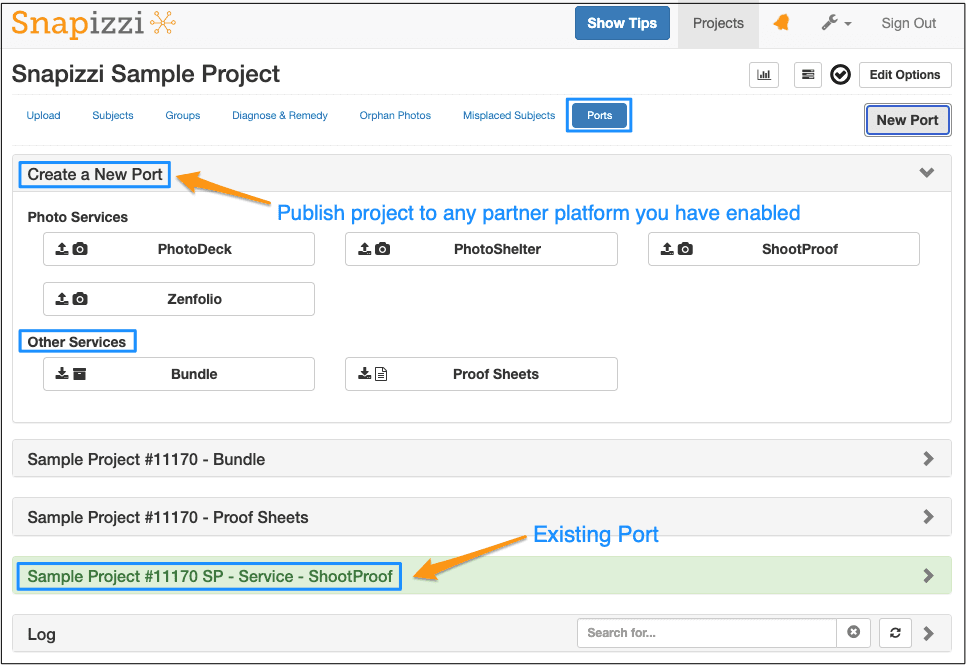
That could mean publishing directly to a connected gallery platform, creating Bundles for another platform, or generating Proof Sheets.
The result is a much more flexible high-volume photography workflow.

At the center of the current workflow is your main Snapizzi project.
Subject data, Camera Cards, keyframes, portraits, groups, and other project information are processed and organized within Snapizzi before anything needs to be published externally.
That distinction matters.
Your gallery platform is no longer the foundation of the organizational workflow. Instead, Snapizzi handles the work that happens before delivery.
Once the project is ready, Ports becomes the bridge between the organized Snapizzi project and its final destination.
For photographers working with thousands of images and hundreds of individual subject galleries, separating those two responsibilities makes the entire system easier to manage.
Your gallery platform handles delivery. Snapizzi handles the high-volume workflow that gets everything ready for delivery.
A Port is where you publish—or “port”—a completed Snapizzi project to a supported connected platform.
Snapizzi currently uses Ports for direct publishing workflows with platforms such as:
ShootProof
PhotoShelter
Zenfolio
PhotoDeck
After Snapizzi organizes the project, the Port sends each photograph to the appropriate destination on the connected platform.
Ports are also where you can create Bundles and Proof Sheets, giving studios additional options when direct publishing is not part of their workflow.
In practical terms, the process becomes:
Capture → Organize in Snapizzi → Port or Export → Deliver
That separation gives photographers significantly more control over when and how completed projects leave Snapizzi.
One of the advantages of this architecture is that Snapizzi does not need to replace your gallery platform.
ShootProof, PhotoShelter, Zenfolio, PhotoDeck, and other platforms can continue doing what they do well: hosting galleries, presenting photographs, handling downloads, storefronts, and delivering images to customers.
Snapizzi concentrates on the workflow before that point.
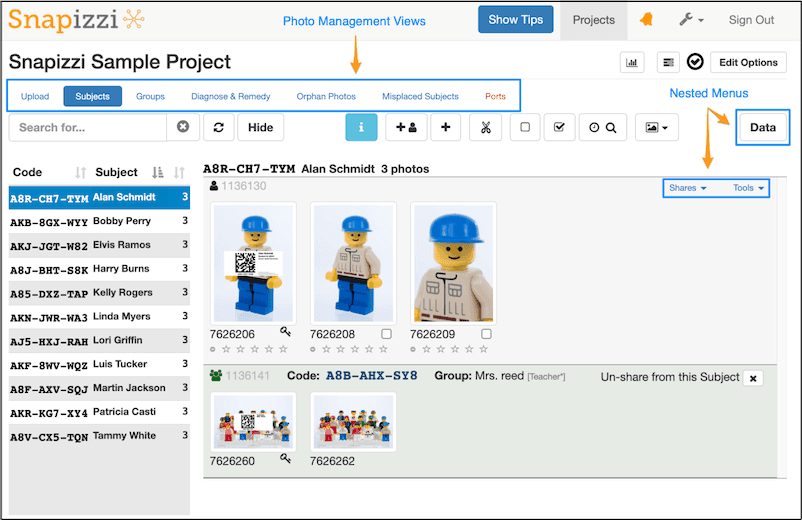
It can help associate photographs with the correct subjects, organize galleries, manage groups, prepare images, and automate repetitive production work.
Then Ports connects that organized project to the delivery platform.
This distinction is especially useful for studios that have spent years building their customer experience around an existing gallery platform and have no reason to replace it.
Why Photographers Don't Need to Switch Platforms to Improve Their Workflow explains this approach in more detail.
Ports also changed when photographers need to create the remote version of a project.
A remote project can be configured when the Snapizzi project is created or added later when you're ready to publish.
That gives studios more flexibility.
You can prepare and review a project inside Snapizzi without immediately committing it to a remote platform.
Once everything is ready, create or update the appropriate Port and let Snapizzi handle the publishing process.
For large projects, that separation can make production much easier to control.
Ports have continued to evolve since their introduction.
Supported remote projects can now use Auto Update, allowing Snapizzi to synchronize changes as the project progresses.
Studios that prefer more control can instead use Manual Updates and decide when changes should be sent to the remote platform.
Auto Update for Remote Projects explains how the two approaches fit into different studio workflows.
This means Ports are no longer simply a final publishing button. They have become an active part of managing the relationship between a Snapizzi project and its remote galleries.
Modern Ports also provide considerably more visibility than the original system.
The Remote Gallery Link gives you a real-time view of the subject galleries and group albums Snapizzi creates on supported connected platforms.
Instead of leaving Snapizzi and manually checking the remote platform, photographers can review gallery creation and remote status directly from the Port.
The Remote Gallery Health Report extends that visibility even further by showing what has been created, uploaded, and linked.
Together, these tools make it easier to identify problems and confirm that a large project has been published successfully.
Not every photography platform needs a direct Snapizzi integration.
Studios using compatible platforms such as Pixieset, CloudSpot, Picflow, Pixnub, or jAlbum can organize their photographs in Snapizzi and use Bundle-based workflows to move the completed project into their preferred platform.
The workflow is slightly different, but the principle is the same:
Snapizzi handles the high-volume organization first.
The gallery platform handles delivery afterward.
That flexibility allows photographers to improve their production workflow without rebuilding the rest of their business around completely different gallery software.
When Ports were introduced, they represented much more than a new project screen.
Moving the organized project into Snapizzi created the foundation for many of the workflow improvements that followed.
Remote project synchronization, improved gallery monitoring, remote repair tools, faster project navigation, additional platform workflows, and greater publishing visibility all benefit from having Snapizzi maintain the organized project before handing it off to another service.
What originally appeared to be a major product redesign has become the normal way Snapizzi works.
And the underlying idea remains simple:
Organize the project once. Keep control of it in Snapizzi. Then send it wherever your workflow needs it to go.
Snapizzi automates subject matching, image organization, gallery preparation, and publishing while allowing you to continue using the gallery platforms that already work for your business.
Explore how the complete workflow comes together in The Complete Guide to School Photography Workflows, or try Snapizzi with your next project.
Note: This article was originally published when Snapizzi introduced its new Ports architecture. Ports have since become a core part of the Snapizzi workflow and gained features including Auto Update, Remote Galleries, additional publishing controls, and improved remote status monitoring. This article has been updated to explain how Ports fit into the current Snapizzi platform while preserving the significance of the original release.
Related Articles
Explore more features, announcements, and workflow improvements.
Related Help Articles
Step-by-step guides and documentation from the Snapizzi Knowledge Base.
Explore These Topics
Find more articles on the topics covered in this post.
Continue Exploring Snapizzi
Content Directory — Browse all articles and workflow resources
Release History — Explore new features and product updates
Knowledge Base — Find tutorials and documentation
User Love — See what photographers say about Snapizzi